AGE
AGE(birthday, date_format)
Returns the age of someone given their birthday.
| birthday | The birthday of the person. |
| date_format | The date format "UK" or "US". |
REMARKS
* If "birthday" is after todays date, then a negative value is returned.
* If "date_format" is left blank, then "UK" is used.
* If "dtBirthday" is not a valid date , then #VALUE! is returned.
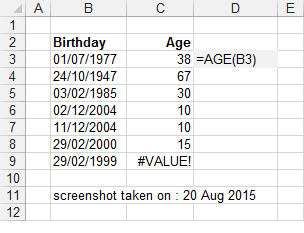
* The formula to return a persons age in years.
* Alternatively you could use the following formula: =INT(YEARFRAC(TODAY(),"01/07/1977",1))
|
1 - What is the age of someone who has a birthday on "1/11/1977".
2 - What is the age of someone who has a birthday on "11/1/1977".
Public Function AGE( _
ByVal dtBirthday As Date) _
As Integer
If Int(dtBirthday) > 0 Then
Select Case Month(Date())
Case Is < Month(dtBirthday)
AGE = Year(Date()) - Year(dtBirthday) - 1
Case Is = Month(dtBirthday)
If Day(Date) >= Day(dtBirthday) Then
AGE = Year(Date()) - Year(dtBirthday)
Else
AGE = Year(Date()) - Year(dtBirthday) - 1
End If
Case Is > Month(dtBirthday)
AGE = Year(Date()) - Year(dtBirthday)
End Select
Else
AGE = CVErr(xlErrNA)
End If
End Function
Function CalcAge(dteBirthdate As Date) As Long
Dim lngAge As Long
' Make sure passed-in value is a date.
If Not IsDate(dteBirthdate) Then
dteBirthdate = Date
End If
' Make sure birthdate is not in the future.
' If it is, use today's date.
If dteBirthdate > Date Then
dteBirthdate = Date
End If
' Calculate the difference in years between today and birthdate.
lngAge = DateDiff("yyyy", dteBirthdate, Date)
' If birthdate has not occurred this year, subtract 1 from age.
If DateSerial(Year(Date), Month(dteBirthdate), Day(dteBirthdate)) > Date Then
lngAge = lngAge - 1
End If
CalcAge = lngAge
End Function
![]() |
© 2026 Better Solutions Limited. All Rights Reserved. © 2026 Better Solutions Limited TopPrevNext
