Comments
A comment is simply some descriptive text that is included within your code.
This text is completely ignored when the program is compiled and does not slow your program down.
Comments should be used to describe what you are doing but probably more importantly why you are doing it.
You should include comments when you develop any workarounds or have really complicated code.
You should obviously comment any changes that you make at a later date.
Any text that follows an apostrophe is considered a comment.
Comments are displayed in green by default.
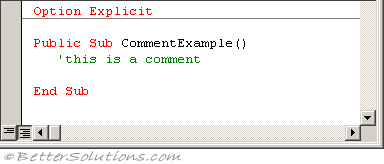 |
The text inside any comments is completely ignored by the compiler and does not affect performance.
A useful debugging technique is to comment out lines of code temporarily. The lines can be easily uncommented afterwards.
Remember that your comments should describe the purpose of the procedures, functions and variables.
Including Comments
Any text that follows an apostrophe is considered to be a comment and is ignored up until the end of the line.
Always add your comments above (as opposed to below) the appropriate line of code.
These are displayed in "green" by default in the Code window.
' This is a comment
Dim sName As String
You can also insert a comment after an instruction on the same line.
sName = ActiveSheet.Name ' This is also a comment
The Comment Block and UnComment Block buttons on the Edit toolbar can be very useful for commenting out several lines of code in one step.
 | Comment Block - Adds the comment character ( ' ) to the beginning of each line in the current selection. |
 | UnComment Block - Removes the comment character ( ' ) from the beginning of each line in the current selection. |
If you are using the Edit toolbar to comment out lines of codes, you only have to place the cursor anywhere on the line for the line to be commented out.
There are no shortcut keys for these two operations although they can be added to a menu and given menu accelerator keys.
Multi-Line Comments
VBA does not support multi-line block comments.
Using Conditional Compilation Arguments
You could alternatively put your comments in between Debugging > Conditional Compilation.
#IF debug = 1 Then
'   this is my comment
#EndIf
Rem Keyword
This is an abbreviation of the word Remark and should not be used for commenting.
Rem this is my comment
The apostrophe (') is the preferred comment indicator, although you can use the "Rem" keyword if you want.
This is a rollover from the BASIC days.
Unlike the apostrophe, the Rem keyword can only be written at the start of line and not on the same line (after an instruction).
Rem comments cannot appear after statements.
The Rem keyword cannot be immediately followed by any of the following characters ! @ # $ % &
If you really want to include a Rem comment on the same line as another statement you must use the line continuation character (:).
Debug.Print "my message"   'my comment
Debug.Print "my message"  : Rem my comment
Shortcut Keys
There are no built-in shortcut keys for adding or removing comments, but you can easily create them.
Right click on any of the toolbars and select Customise
Select the Commands tab and select the Edit category on the left hand side.
Drag the "Comment Block" and "Uncomment Block" commands to a menu (not a toolbar).
Right click on each one and prefix it with a "&"
&Comment Block
&Uncomment Block
Check the image and text
Close - SS
Remember
Don't comment for the sake of it or bother commenting the obvious.
The compiler will ignore any text (up until the end of the line) that follows an apostrophe unless the apostrophe is contained inside a string.
When you are testing a subroutine and you want to ignore certain lines of codes you can just temporarily change them into comments.
© 2026 Better Solutions Limited. All Rights Reserved. © 2026 Better Solutions Limited TopPrevNext