References
It is possible to add external libraries to your VBA projects, to access additional functionality.
You can see which libraries are being used using (Tools > References).
References to external object libraries are saved with the actual file (workbook, document etc), they are not general settings.
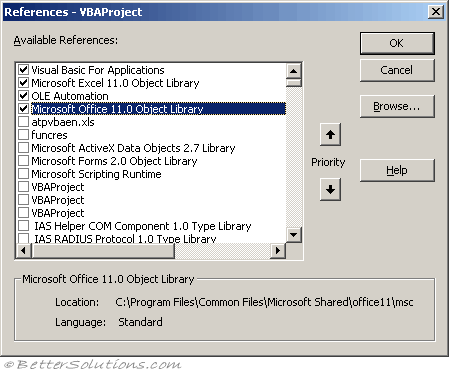 |
The core VBA libraries "Visual Basic for Applications" and the "Application Specific Object Library" cannot be removed.
This list will include any object libraries or ActiveX controls that are installed on your computer.
All the boxes with checks against them indicate that these object libraries are currently available to your project.
| Full Library Name | Description | |
| Acrobat Distiller | Producing a PDF File | |
| Front Page Controls fpdtc.dll | Frontpage design time controls | |
| Microsoft Access 16.0 Object Library msacc.olb | ||
| Microsoft ActiveX Data Objects 2.8 msado28.tlb | Needed for accessing a database using ADO | |
| Microsoft CDO 1.21 Library | ||
| Microsoft CDO for Windows 2000 Library cdosys.dll | Exposes the interfaces of the Messaging Application Programming Interface (MAPI) | |
| Microsoft COM Services ole32.dll | Needed for creating certain COM applications and COM services. | |
| Microsoft DAO 3.6 Object dao360.dll | Needed for accessing a database using DAO | |
| Microsoft Excel 16.0 Object Library excel.exe | C:\Program Files\Microsoft Office 16.0\Root\Office 16.0\ | |
| Microsoft Forms 2.0 Object fm20.dll | C:\Windows\System32\ | |
| Microsoft HTML Object Library mshtml.tlb | C:\Windows\System32\ | |
| Microsoft Internet Controls Library (WebBrowser) ieframe.dll | Used to programmatically interact with Internet Explorer C:\Windows\System32\ | |
| Microsoft Office 16.0 Object Library mso.dll | C:\Program Files\Common Files\Microsoft Shared\Office16\ C:\Program Files\Microsoft Office\root\vfs\ ProgramFilesCommonX86\Microsoft Shared\Office16\ | |
| Microsoft Office Soap Type Library 3.0 mssoap3.dll | ||
| Microsoft Outlook 16.0 Object Library msoutl.olb | ||
| Microsoft PowerPoint 16.0 Object Library msppt.olb | ||
| Microsoft Script Control 1.0 msscript.ocx | Can provide general-purpose scripting services | |
| Microsoft Scripting Runtime scrrun.dll | Needed for accessing files and folders C:\Windows\System32\ | |
| Microsoft VBScript Regular Expressions 5.5 vbscript.dll | Needed for performing regular expressions C:\Windows\System32\ | |
| Microsoft Visual Basic for Applications Extensibility vbe8txt.olb | Needed for manipulating userforms at run-time | |
| Microsoft WinHTTP Services 5.1 winhttpcom.dll | Provides a http/https client for making GET and POST http requests and is browser independent. Can handle authentication and proxy support C:\Windows\System32\ | |
| Microsoft Word 16.0 Object Library msword.olb | C:\Program Files\Microsoft Office\root\Office16\ | |
| Microsoft XML 6.0 msxml6.dll | C:\Windows\System32\ | |
| OLE Automation stdole2.tlb | Contains the basic functions for ActiveX automation C:\Windows\System32\ | |
| Process Status API psapi.dll | Can inspect running processes and memory usage | |
| Visual Basic for Applications vbe7.dll | C:\Program Files (x86)\Common Files\Microsoft Shared\VBA\VBA7.1\ | |
| Windows Common Controls 2.6.0 mscomct2.ocx | Common date controls |
| Full Library Name Description |
| Acrobat Distiller Producing a PDF File |
| Front Page Controls fpdtc.dll Frontpage design time controls |
| Microsoft Access 16.0 Object Library msacc.olb |
| Microsoft ActiveX Data Objects 2.8 msado28.tlb Needed for accessing a database using ADO |
| Microsoft CDO 1.21 Library |
| Microsoft CDO for Windows 2000 Library cdosys.dll Exposes the interfaces of the Messaging Application Programming Interface (MAPI) |
| Microsoft COM Services ole32.dll Needed for creating certain COM applications and COM services. |
| Microsoft DAO 3.6 Object dao360.dll Needed for accessing a database using DAO |
| Microsoft Excel 16.0 Object Library excel.exe C:\Program Files\Microsoft Office 16.0\Root\Office 16.0\ |
| Microsoft Forms 2.0 Object fm20.dll C:\Windows\System32\ |
| Microsoft HTML Object Library mshtml.tlb C:\Windows\System32\ |
| Microsoft Internet Controls Library (WebBrowser) ieframe.dll Used to programmatically interact with Internet Explorer C:\Windows\System32\ |
| Microsoft Office 16.0 Object Library mso.dll C:\Program Files\Common Files\Microsoft Shared\Office16\ C:\Program Files\Microsoft Office\root\vfs\ ProgramFilesCommonX86\Microsoft Shared\Office16\ |
| Microsoft Office Soap Type Library 3.0 mssoap3.dll |
| Microsoft Outlook 16.0 Object Library msoutl.olb |
| Microsoft PowerPoint 16.0 Object Library msppt.olb |
| Microsoft Script Control 1.0 msscript.ocx Can provide general-purpose scripting services |
| Microsoft Scripting Runtime scrrun.dll Needed for accessing files and folders C:\Windows\System32\ |
| Microsoft VBScript Regular Expressions 5.5 vbscript.dll Needed for performing regular expressions C:\Windows\System32\ |
| Microsoft Visual Basic for Applications Extensibility vbe8txt.olb Needed for manipulating userforms at run-time |
| Microsoft WinHTTP Services 5.1 winhttpcom.dll Provides a http/https client for making GET and POST http requests and is browser independent. Can handle authentication and proxy support C:\Windows\System32\ |
| Microsoft Word 16.0 Object Library msword.olb C:\Program Files\Microsoft Office\root\Office16\ |
| Microsoft XML 6.0 msxml6.dll C:\Windows\System32\ |
| OLE Automation stdole2.tlb Contains the basic functions for ActiveX automation C:\Windows\System32\ |
| Process Status API psapi.dll Can inspect running processes and memory usage |
| Visual Basic for Applications vbe7.dll C:\Program Files (x86)\Common Files\Microsoft Shared\VBA\VBA7.1\ |
| Windows Common Controls 2.6.0 mscomct2.ocx Common date controls |
Here is a list of common Windows APIs (advapi32.dll, kernel32.dll, shell32.dll, user32.dll)
MISSING
If you try and run an application on a computer that does not have all the external object libraries installed you will get a compile-time error which cannot be trapped using normal methods.
If any of the references are missing then it will not find any references
SS
You can browse for object libraries (.olb and .tlb) or executables (.exe and .dll). Sometimes you can find you have "Missing" references.
Assuming that it is not required deselect it and choose (Debug > Compile Project).
Early Binding
we are binding the external object library to our application at design-time
Using early binding gives the following benefits:
The code is much faster, as all the links between the libraries have already been checked and compiled.
The New operator can be used to create instances of the external objects.
All of the constants defined in the object library can be utilised therefore avoiding magic numbers.
Excel displays the Auto List Members, Auto Quick Info and Auto Data Tips information for the objects while the application is being developed.
Late Binding
If the reference is not listed you can select the "Browse" button to add an additional file.
If the library isn't listed then it is flagged as "MISSING".
Remember
Once a reference has been added it will be automatically added to the libraries drop down list in the Object Browser
© 2026 Better Solutions Limited. All Rights Reserved. © 2026 Better Solutions Limited TopPrevNext