Visual Basic Editor
Visual Basic is the common language behind all the Microsoft Office applications (Excel, Word, PowerPoint, Outlook, Access)
VBA is an object-oriented programming language that is identical to the Visual Basic programming language.
If you learn how to write and understand Excel VBA, you will be able to use VBA in all the other Office applications.
Each Office applications has a different set of objects, known as the object model.
To program a particular office application, you need to be familiar with that particular object model.
 |
Displaying the Visual Basic Editor
There are several ways to display the Visual Basic Editor:
1) Select the Developer tab and press Visual Basic.
2) Press (Alt + F11) to quickly toggle between your application and the VBE.
3) Right click on an Excel worksheet tab and select "View Code"
Recording and Understanding Macros
In order to understand macros and to be able to modify your macros you need to use the Visual Basic Editor (VBE).
The Visual Basic Editor has its own separate window and looks like an application in its own right.
The VBE is also know as the Visual Basic IDE (Integrated Development Environment).
All of the Microsoft Office applications have a Visual Basic Editor built-in.
Components
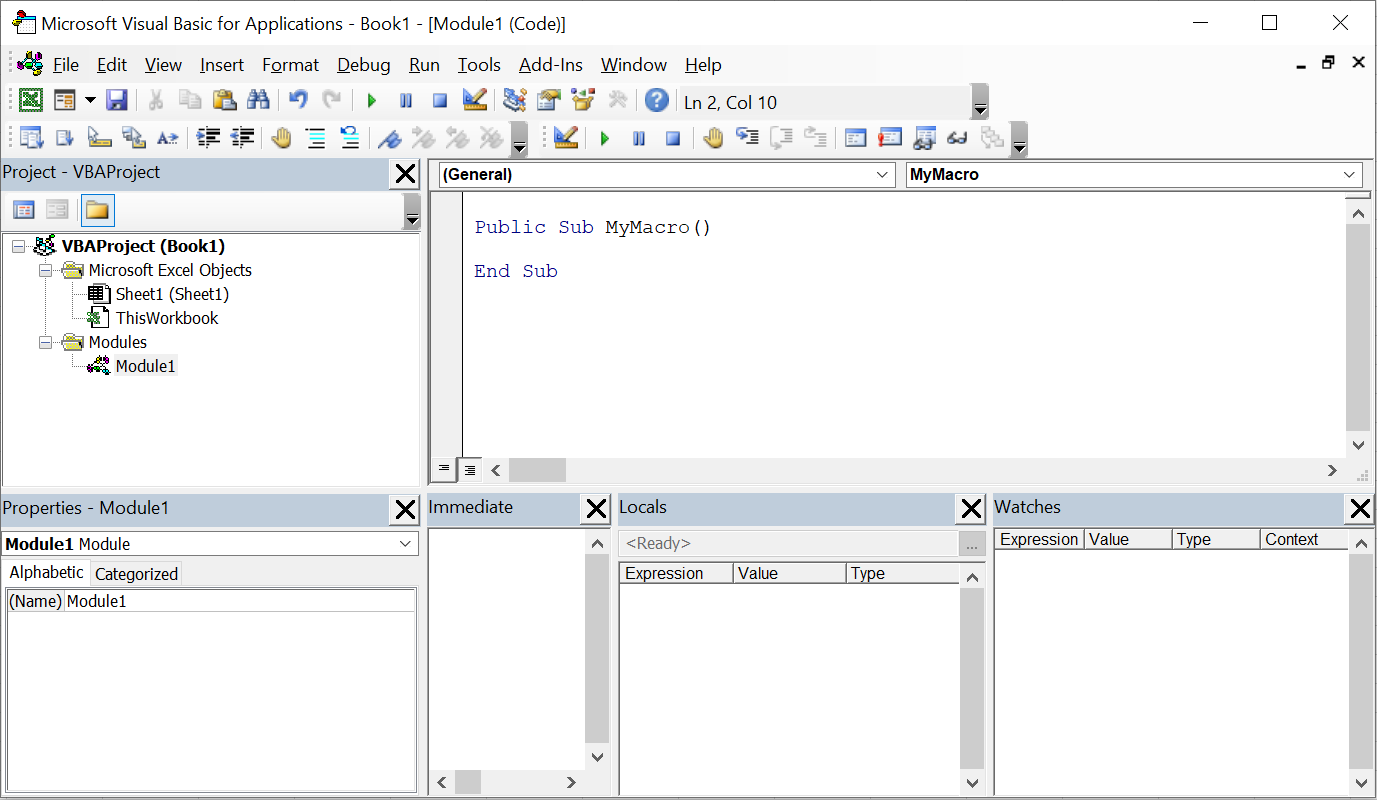
Here is a description of the key components.
Menu Bar - The horizontal collection of drop-down menus at the very top.
Toolbars - There are five toolbars that can be displayed.
Project Explorer - Displays a hierarchical list of the projects and all of the items contained and referenced by each project.
Properties Window - Displays all the properties of the object (relating to the active project, userforms or control).
Code Window - Displays the code associated with the item selected in the Project Explorer window.
Immediate Window - Displaying variables and executing lines of code.
Locals Window - Displays all the variables used in the current subroutine.
Watch Window - Displays the current value of variables as you step through the code.
Subroutines - A subroutine is a series of statements that performs a specific task.
Functions - A function is a series of statements that performs a specific task which can also return a value.
Built-in Keywords - A keyword is a special word that is reserved and used by the compiler.
Built-in Functions - A built-in function that can perform a specific task.
Built-in Data Types - A data type refers to how the data is stored in memory and how much space it takes up.
Built-in Operators - An operator is an element that performs an operation on one or more code values.
Built-in Enumerations - An enumeration is a type that has been defined to represent a fixed set of possible values.
Arranging Windows
Most of the windows in the IDE including the Project, Properties and Immediate windows can be either docked or floating.
You can also dock the windows to any side of your application window.
You can close the windows and move them around to create more space for the code window.
A docked window is attached or anchored to an edge of the main window.
When a dockable window is moved it snaps to an anchored position.
A floating window on the other hand can be placed anywhere on the screen. You can change the state of your windows from (Tools > Options)(Docking tab).
© 2026 Better Solutions Limited. All Rights Reserved. © 2026 Better Solutions Limited TopNext