Add-ins - C#
Using the C# programming language you can create COM Add-ins.
Most COM add-ins are written using the Visual Studio Tools for Office framework also known as VSTO.
This framework was created by Microsoft specifically for building .NET based add-ins and customizations for Microsoft Office.
These add-ins remain loaded even after they have been unchecked from the COM Addins dialog box.
They are only unloaded when Excel is closed.
COM Add-ins
COM Add-ins are Component Object Model extensions that can integrate deeply with Excel and other Office apps.
They are typically built using C#, VB.NET, or C++ and are compiled into a DLL.
They provide capabilities beyond what VBA can do, and they load through the COM interface mechanism in Windows.
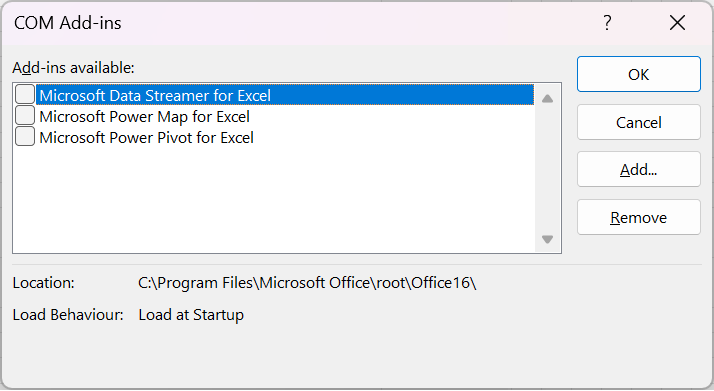
You can see which COM add-ins are installed by clicking on the COM Add-ins button on the Developer tab.
(File > Options)(Add-ins tab) Change the Manage drop-down to COM Add-ins and press Go.
 |
Developing COM Add-ins
Most modern COM add-ins are written using the Visual Studio Integrated Development Environment.
This is Microsoft's all-in-one desktop application used for creating applications and extensions for the Windows platform.
This model includes both application and document level solutions and developers usually create these using the C# programming language.
You can only build COM add-in using the Visual Studio IDE.
This can be downloaded for FREE from the Microsoft website.
link - https://visualstudio.microsoft.com
More Information
[[C# > Excel Interop > COM Add-ins]]
© 2026 Better Solutions Limited. All Rights Reserved. © 2026 Better Solutions Limited TopPrevNext