Troubleshooting
Prompt when you Open
If a previously "installed" add-in is moved or deleted, the next time you close and re-open Excel you will see the following prompt.
If an add-in was ticked and then becomes unavailable you will see the following prompt when you open Excel.
This prompt displays the folder path and the filename of the add-in that cannot be found.
 |
This message will appear every time you open Excel until you remove this add-in from your list.
Prompt when you Select
If an add-in that was not ticked becomes unavailable there is no prompt when you open Excel.
The only time you will see a prompt is if you click on this entry in the Add-ins dialog box.
Selecting it in the list will display the following prompt.
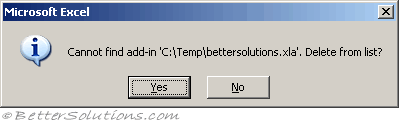 |
Pressing Yes will remove the add-in from the Add-ins dialog box list and remove the corresponding registry entry.
Disabled Items
The disabled items are stored in registry:
HKEY_CURRENT_USER\Software\Microsoft\Office\12.0\Word\Resiliency\DisabledItems
Excel 7.0 Add-ins
If you attempt to view a project in the Project Explorer window it may display a message saying "Project is Unviewable".
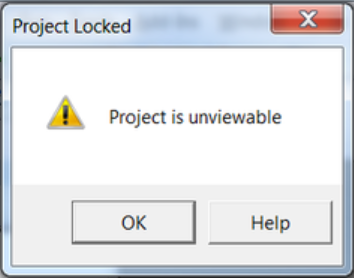 |
This happens when the Excel add-in has been created in either Excel 5.0 or Excel 7.0.
You cannot view or edit the code in these add-ins.
Local Copies
Pressing "Yes" on this message box will save a copy of the add-in in the following folder:
These add-ins do not appear in the registry as they are loaded automatically.
This folder is also the default folder path when you save a workbook as an Excel add-in.
Excel 2016 - C:\Users\"user name"\App Data\Roaming\Microsoft\Addins\
Excel 2013 - C:\Users\"user name"\App Data\Roaming\Microsoft\Addins\
© 2026 Better Solutions Limited. All Rights Reserved. © 2026 Better Solutions Limited TopPrevNext