Automate Tab
Once Office Scripts has been enabled by your administrator you will see an additional tab called "Automate".
 |
New Script - Drop-Down. Lets you choose how you want to create your script.
View Script - Drop-Down. Lets you access recent scripts and samples.
Office Scripts Gallery - A gallery of your recent scripts and all the available samples.
Automation Templates - Displays the Power Automate task pane allowing you to integrate with Power Automate to create flows (previously Flow Templates).
New Script
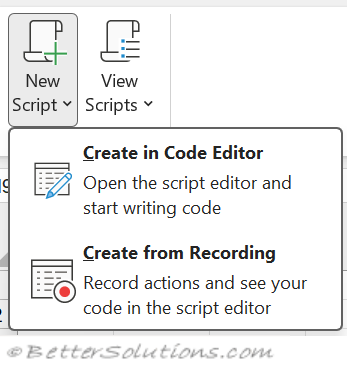 |
Create in Code Editor - This displays the Office Scripts task pane.
Create from Recording - This displays the Record Actions task pane.
View Scripts
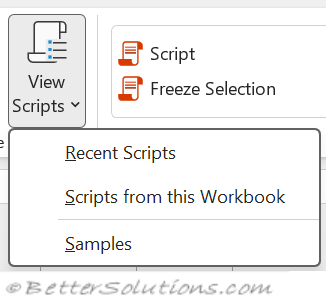 |
Recent Scripts - Displays the Office Scripts task pane with the "Recent" tab selected showing you a list of all the previously run scripts.
Scripts from this Workbook - Displays the Office Scripts task pane with the "This workbook" tab selected showing you.
Samples - Displays the Office Scripts task pane with the "Samples" tab selected showing a list of all the available samples.
Earlier Version
The earlier version on this tab can be seen below.
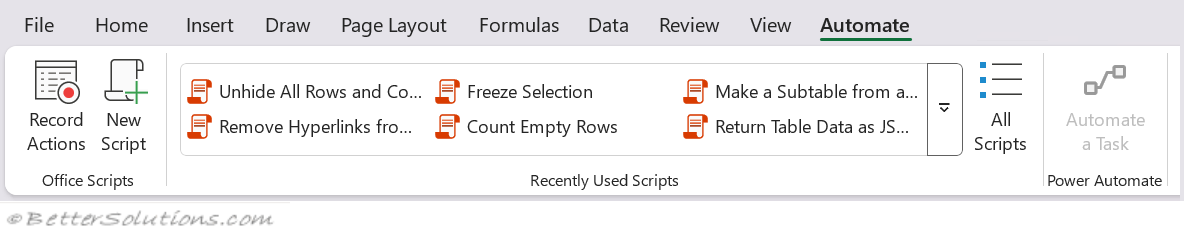 |
Record Actions - This displays the Record Actions task pane.
New Script - This displays the Office Scripts task pane.
Recently Used Scripts - Displays the Office Scripts task pane with the "Recent" tab selected showing you a list of all the previously run scripts.
All Scripts - Displays the Office Scripts task pane with the "Recent" tab selected showing you a list of all the previously run scripts.
Automate a Task - Displays the Automate Work task pane allowing you to integrate with Power Automate to create flows.
© 2026 Better Solutions Limited. All Rights Reserved. © 2026 Better Solutions Limited TopPrevNext