Flash Fill
Added in Excel 2013.
Excel can recognise patterns of text
In most cases when you start to type the second entry you will see an autocomplete cell drop-down.
Prior to Excel 2013 these types of manipulations would have required formulas.
Now using Flash Fill these can be done automatically without the use of formulas.
Instead of using formulas you can just type in your new format into an additional column.
When you start to type your new format into the second cell, the new format is previewed in the whole column
Ctrl + E
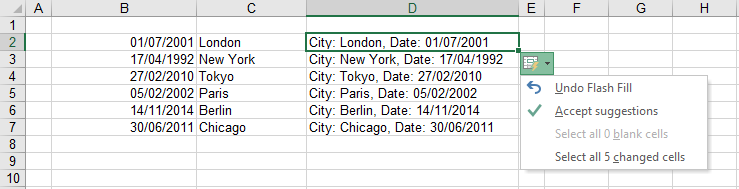
This populates the cells with the recognised pattern and displays the smart tag
Enter the first entry, press Enter, press (Ctrl + E) to populate and show the smart tag
SS
Undo Flash Fill
Accept Suggestions
Select all 4 changed cells
Double Click Left Mouse Button
Drag Down Right Mouse Button
Enter the first name
Drag the cell down and choose "Flash Fill" from the shortcut menu
Flash Fill Smart Tag
Check your Options
The Flash Fill Smart tag will not appear unless you have chosen to use Flash Fill.
Check your Options (Advanced tab, Automatically Flash Fill)
SS
Displaying the Smart Tag
When data is extracted from a database the columns are often not in the right format. For example:
Dates might be in the wrong format
First Names and last names might need to be concatenated together
Values need to have currency associated to them
Text has to be changed to proper casing
Pressing Enter will populate the cells.
The Flash Fill Options smart tag will be displayed
SS
To get automatic suggestions you have to:
be editing in the column next to your data
enter two sequential edits, one on top of the other
Fill Text
Combine First and Last Name
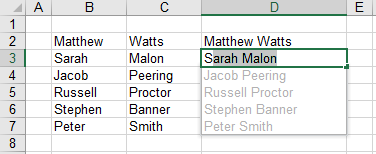 |
Add First Name Initial
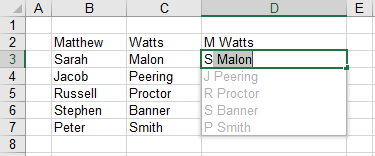 |
Remove Last Name
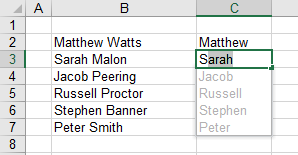 |
Fill Dates
Extracting Year
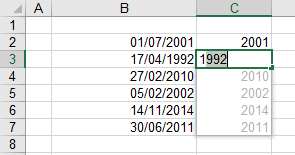 |
Concatenating Dates
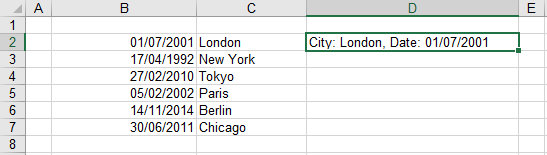 |
Enter you concatenation into the first row and press (Ctrl + Enter) at the end
Press (Ctrl + E) will auto-populate the rest of the table and display the flash fill smart tag
 |
© 2026 Better Solutions Limited. All Rights Reserved. © 2026 Better Solutions Limited TopPrevNext