ProgressBar
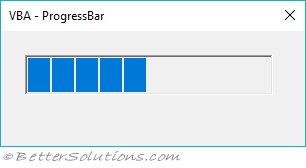
This control indicates the progress of an action by displaying a horizontal bar.
 |
Additional Reference
Alternative No Reference
Create a Userform
(Insert > Userform)
Caption: "Progress Indicator"
Resize: Height - 75, Width - 215
(View > Toolbox)
Add a Frame
Remove the Caption "Frame1"
Resize: Height - 24 and Width - 200
Reposition: Top - 24, Left - 6
Add a Label inside the Frame
Change the Name to "lblBar"
Remove the Caption "Label1"
BackColor: Highlight
Resize: Height - 20 Width - 10
Reposition: Top - 1, Left - 2
Add a Label on the Userform
Change the Name to "lblDescription"
Change the Caption to "0% Completed"
Resize: Height - 16, Width - 190
Reposition: Top - 6, Left - 10
Add a UserForm_Activate event
(View > Code) when the Userform is displayed
Change the top left drop-down to "Userform"
Change the right drop-down to "Activate"
Add the following code
Private Sub UserForm_Activate()
    Call TestProgressBar
End Sub
Insert a code Module
(Insert > Module)
Add the following code
Sub TestProgressBar()
Dim oUserform As UserForm1
Dim lrow As Long
Dim icount As Integer
Dim itotalcount As Integer
    itotalcount = 0
    For lrow = 1 To 5
        For icount = 1 To 1000
            itotalcount = itotalcount + 1
            Cells(lrow, 1).Value = icount
            Call UpdateProgress(itotalcount / 5000)
        Next icount
    Next lrow
End Sub

Sub UpdateProgress(ByVal sngPercentage As Single)
    UserForm1.lblDescription.Caption = VBA.Int(sngPercentage * 100) & "% Completed"
    UserForm1.lblBar.Width = (sngPercentage * 195)
    DoEvents
End Sub
Run the code
Double click the Userform1 to display the Userform
Press F5
© 2026 Better Solutions Limited. All Rights Reserved. © 2026 Better Solutions Limited TopPrevNext